
SQL Trainer for Academic and Play: a zero-install WASM SQLite playground that runs in your browser - Done in 2 Days
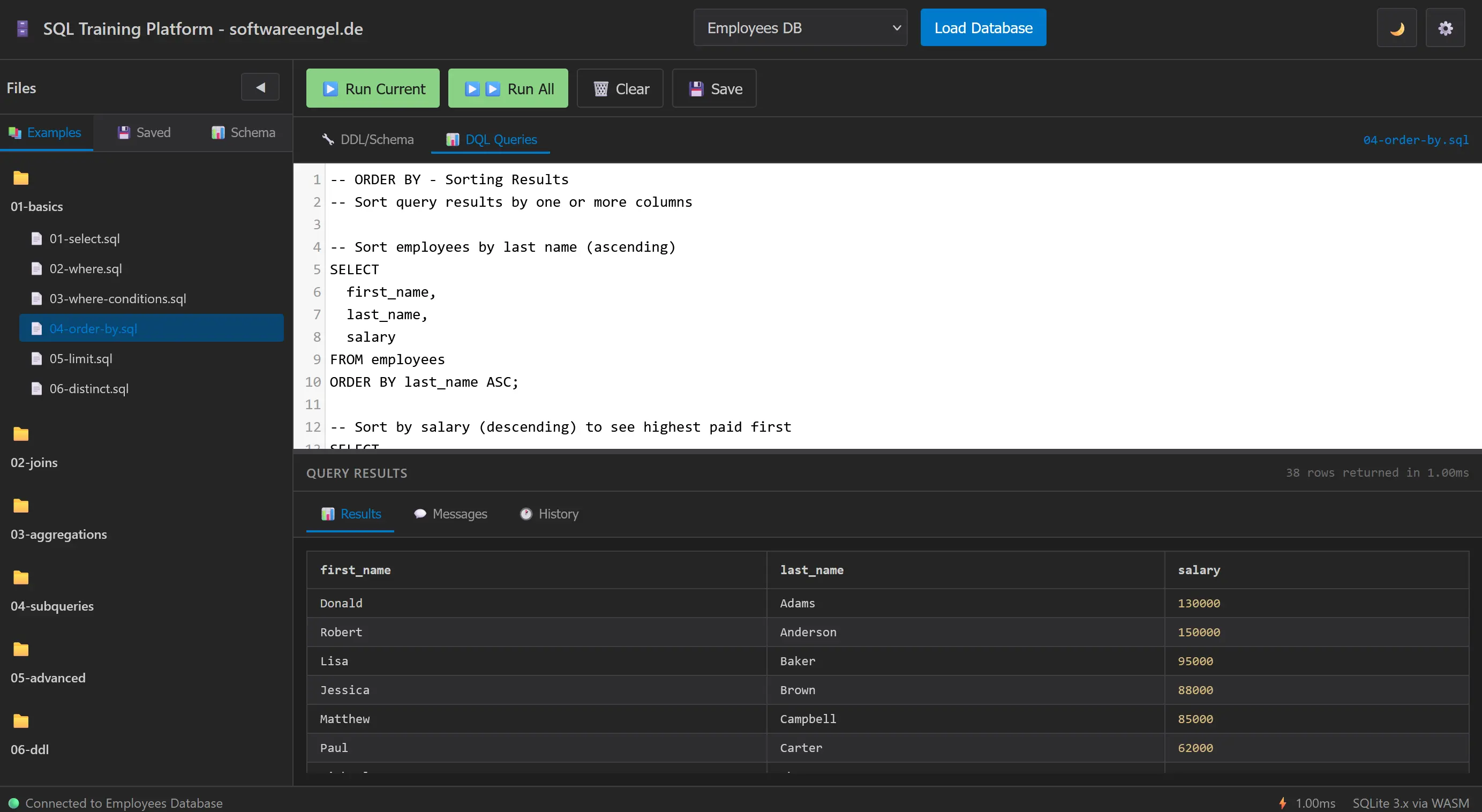
SQL Trainer for Academic and Play: a zero-install SQLite playground that runs in your browser
TL/DR: Check https://softwareengel.github.io/hacker-codes/
If you’ve ever tried to teach (or learn) SQL in a classroom, you know the “first hour problem”: installing a database, setting up credentials, dealing with different OSes, and then explaining why a query fails for reasons unrelated to SQL.
This project is my attempt to remove that friction entirely.
The result is a small, static web app: an interactive SQL training platform that runs SQLite in the browser via WebAssembly (SQL.js), with a real editor (CodeMirror), curated examples, and realistic sample databases. No backend. No accounts. It can work offline as a PWA after the first load.
What it is
A client-side SQL learning environment that lets you:
-
Load a sample database (e.g. employees, e-commerce, school, countries/counties)
-
Browse example SQL files by topic (basics → joins → aggregations → subqueries → advanced → DDL/DML)
-
Run SQL and inspect results immediately
-
Save queries and keep a local query history (IndexedDB)
-
Export results (CSV/JSON)
It is intentionally “just HTML/CSS/JS”, because the goal is to be deployable anywhere static files can live (GitHub Pages included) and to be easy to understand and extend in an academic context.
Who it’s for
-
Instructors: a reliable in-class demo tool that doesn’t require local DB installs
-
Students: a safe sandbox for practicing SQL repeatedly without setup fatigue
-
Builders: a lightweight “SQL scratchpad” for quick prototyping and experimenting
The name “Academic and Play” is deliberate: the same environment works for structured coursework and for playful exploration.
The design constraints (and why they matter)
I built the platform around a few hard constraints that keep it practical:
-
Zero backend: everything runs in-browser
-
Deterministic sample data: the same queries produce the same results for everyone
-
Offline-first: caching + local storage make it resilient in real classrooms
-
Small mental model: vanilla JS modules and clear component boundaries
Under the hood, the app is basically:
-
UI (file browser, editor, results)
-
Application controller (glue)
-
SQLite manager (SQL.js WASM)
-
Storage manager (IndexedDB)
A short origin story (from the repo)
This project lives inside the hacker-codes repository as 2026/2026-04-dbms-sql.
The commit history shows a very pragmatic evolution:
-
2026-04-10: foundation and early validation work (unit tests, refactors)
-
2026-04-11: GitHub Pages deployment pipeline and a real-world “it works locally, fails on Pages” fix
-
2026-04-18: E2E reliability work across browsers and mobile viewports
-
2026-04-19: product features that improve the learning loop (run current statement vs run all statements) and more realistic datasets (Counties database)
I kept a prompt-by-prompt build log in doc/chatlog/ while iterating, which turned out to be a surprisingly useful way to document the engineering story.
Quality as a feature: tests and “no surprises” behavior
A learning tool is only helpful if it behaves consistently.
That’s why a lot of effort went into:
-
Playwright E2E tests (multiple desktop browsers and mobile viewports)
-
Fixing race conditions that only show up under automation
-
Making the UI predictable: visible/hidden states, stable selectors, clear status messages
One concrete example from the build log: early on, E2E tests were failing because “Ready” status could appear before the database had actually loaded. Tightening the “Connected to …” readiness signal and preventing duplicate loads (by ensuring a fresh SQL.js Database instance per batch load) turned flakey tests into deterministic ones.
The feature that changed the teaching flow: Run Current vs Run All
Many SQL teaching files contain multiple statements separated by semicolons.
A single “Run Query” button forces students to either:
-
delete statements, or
-
copy/paste, or
-
comment/uncomment blocks.
So the platform added two execution modes:
-
Run Current: execute the statement under the cursor (or the current selection)
-
Run All: parse and run all statements sequentially
The parser is intentionally simple but practical: it splits on semicolons while respecting strings and comments.
In practice, this is one of those “small” UX changes that reduces friction dramatically during exercises and live demos.
Datasets: realistic enough to teach joins (without overwhelming beginners)
The platform includes multiple sample databases with different “shapes”:
-
Employees (HR-like tables)
-
E-Commerce (orders, products, categories)
-
School (courses, students, enrollments)
-
Counties/Countries (geographic entities and relationships)
There is also a documented attempt to add Northwind (the classic Microsoft sample database). The build log captures a real-world gotcha: reserved keywords and identifier quoting (e.g. a table called “Order Details”). That entry is intentionally kept as a learning artifact—because SQL education includes these sharp edges.
Prompt-driven development log (abridged)
Below is a condensed “prompt → change” history extracted from the files in doc/chatlog/. This is not meant as marketing; it’s meant as an honest engineering trace.
2026-04-10 — Fix Playwright E2E failures
Prompt intent:
- “Fix all remaining Playwright E2E test failures”
Outcomes:
-
Improved database loading determinism in tests (wait for explicit connection state)
-
Removed a duplicate-load failure mode (“table already exists”) by reinitializing SQL.js DB on batch load
-
Fixed strict locator issues and modal timing assumptions
-
Implemented query history refresh so UI reflects persisted history
-
Result: 37/37 Playwright tests passing for the targeted suite
2026-04-11 — GitHub Pages 404 for lib/ assets
Prompt intent:
- “Fix missing lib files causing 404 errors on GitHub Pages”
Outcome:
-
Root cause was gitignore excluding
lib/while the app referenced locallib/paths -
Fix was to include the required
lib/assets in the repository so static hosting works
This is a classic example of why “static app” doesn’t automatically mean “deployment is trivial”: your dependencies must be shipped.
2026-04-18 — Mobile E2E and cross-browser stability
Prompt intent:
- “Fix failing Playwright tests on mobile viewports”
Outcomes:
-
Sidebar is off-screen on mobile by CSS transform; tests needed a reliable way to open it
-
Added helpers that open/close the sidebar for mobile runs without impacting desktop behavior
-
Reduced CodeMirror timing flakiness by waiting for editor initialization where necessary
-
Adjusted performance thresholds for browser variance
-
Result: 148/148 tests passing across the configured desktop browser projects
2026-04-19 — Run Current vs Run All Statements
Prompt intent:
- “Execute only statement under cursor or selection; also run all statements”
Outcomes:
-
Editor gained cursor/selection introspection
-
Added statement parsing that respects strings and comments
-
Run All executes statements sequentially and reports summary feedback
2026-04-19 — Northwind database addition (documented attempt)
Prompt intent:
- “Add Northwind SQLite database as a sample DB”
Outcome:
-
The log captures schema + data shaping decisions (e.g. removing BLOB-heavy fields)
-
Also captures the quoting/reserved-keyword issue that blocked a clean integration
-
Status: recorded as an in-progress attempt and kept as a learning note
Why I think this belongs on Hacker News / YC radar
This is not trying to out-compete full SQL IDEs.
It’s a “fast, local, repeatable learning loop” for SQL:
-
Students can start in seconds
-
Instructors can rely on consistent behavior
-
The codebase is intentionally approachable (vanilla JS, clear modules)
In other words: it’s a small tool that removes a surprisingly large amount of classroom friction.
Try it (developer-friendly)
The simplest way to run:
-
Open https://softwareengel.github.io/hacker-codes/ in a modern browser
-
Or serve the folder with a small local server (recommended for WASM loading)
-
Or checkout repo project from repo https://github.com/softwareengel/hacker-codes/tree/main/2026/2026-04-dbms-sql
There are dedicated test suites (Jest + Playwright) that acted as guardrails during the build.
What’s next (small, realistic)
If I continue iterating, the next steps will likely be:
-
Polish the “Northwind integration” path by standardizing identifier quoting and avoiding reserved-word traps
-
Keep expanding example sets where they improve the teaching arc (not just for “more content”)
-
Maintain cross-browser reliability as a first-class constraint
Note
- This post was written from the repo state as of 2026-04-21.
- The first Class has worked with it - today ;-)